Mac games Only the Best Mac Game Reviews in Town!

Big Deck Solitaire

Order Solitaire NowDownload the free demo version of  Big Deck Solitaire now

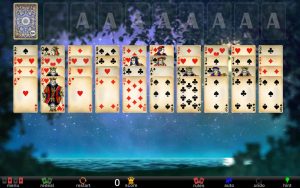
It’s been one hectic year for Mac gaming, but luckily before the year's end, here's one game that's an encouraging sign that life is good. Big Deck Solitaire is classic mac solitaire that most everyone is familiar with. This version has been simplified for easy access to the game. There are no bells or whistles to distract your concentration and relaxation, which is a welcome relief to some card gamers. It is your basic bare bones solitaire game with a few choices, stats and clear explanations to teach new players. Veteran gamers can review rules if necessary. So, be prepared to loosen your collar, get into your sweats and unwind your head full of noise.

There are six different games to choose from: Klondike, which is probably the solitaire game practically everyone plays, (two variations of Klondike are included), Free Cell, Spider (one suit), Spider (two suits), and Spider (four suits). The Klondike game has seven tableau piles with the top card only facing up. There are foundation piles at the top where you will place your cards starting from an ace to a king all in the same suit. Once you remove your face card the next card will flip over automatically. You can move your face cards to other foundation piles as long as it is in descending order and every other card must be a different color. For example you can place a red queen on a black king and then the jack will need to be red. You can also move blocks of cards as long as they are in order. In order to advance in the game you may need to play the stockpile at the top left of the screen. In one deal Klondike only one card from the stockpile will reveal at a time. In the three card deal Klondike, three cards will reveal at a time but you can use only the top card. After depleting the stockpile, you can replay the used cards by clicking on the curved arrow at the bottom of the deck. To win this game all the cards must be on the foundation piles.

In Free Cell all the cards are faced up on eight tableau rows. There are four foundation slots at the top left and on the right there are four reserve spaces. Any card can be moved to an empty reserve space or tableau pile. Cards can be placed on the foundation pile by starting from the ace in ascending order (A, 2, 3, 4, etc.).

The Spider games are played the same whether you play one, two or four suits. The open cards can be moved to other open cards in descending order (5, 4, 3, etc.). You build your sequence of cards from King to Ace and can be moved to the foundation at the top of the screen. When you click on the stockpile, it will distribute cards across the board on each tableau column. You can only move a group of cards from the foundation when they are in order with every other card a different color. To win in all the games, you must clear the foundation.

Big Deck Solitaire will display a sideboard with rules or statistics to view readily. The stats will show games played, victories, losses, streaks, number of moves, average times, etc. Once you are good at the games, you can challenge yourself by beating your stats. If you do not need the sidebar, click on the arrows at the top right to get rid of it. In addition you can zoom in or out making the cards smaller or larger. Big Deck will even size to cinema displays without losing graphic resolution, which means you can have a truly clear BIG deck on your BIG computer display! Another one of our favorite features of this game is the autoplay button; when you know you have won, hit autoplay to finish the game for you. This will avoid the obvious clicking of the few remaining cards.

Play Big Deck Solitaire to relax and entertain yourself or challenge yourself by timing your play or using the least number of cards to win. There are six different solitaire games to keep you interested, and you will not get distracted with a storyline or background scenes. Like Zen Stones you can om your way through the day in one soothing game play. All of us at macgames.org are happy to bring you Big Deck Solitaire, and we hope you'll enjoy it as much as we enjoyed developing it. So, sit back, launch the game, relax and focus on the mantra: now's the time for big fun...

Features: 1) Klondike (one card deal), Klondike (three card deal), Free Cell, Spider (one suit), Spider (two suits), Spider (four suits); 2) Statistics; 3) Customizeable background color; 4) Choose from two kinds of card decks; 5) Fits and sizes to screen / Mac display sizes small and large.
Order Big Deck Solitaire NowDownload the free demo mac solitaire now

Comments (27) Trackbacks (0)
  1. I don’t know if anyone has noticed, but if you put the cards up the top you get points, but then you can take them down without the points being taken off you. Then as before, you can put them back up and get points for it again. If this process is done numerous times you can end up with a rather large score.

  2. thanks for your comment. that issue has been fixed! please feel free to download the new demo.

  3. My sidebar seems to be bugged. The list starts at Free Cell. I can’t see the two Klondike games – the big gray title bar seems to be covering them. I can “arrow up” and select a Klondike game but seem to keep getting the “draw one” version. Any fix for this?

    Otherwise – nice game.

  4. Update…

    Figured out the “draw 3″ version is right above Free Cell so I can live with not seeing the Klondike games – minor annoyance at most.

    Now that I’ve been able to try a Klondike draw 3 game, it only allows me to go through the deck once. I can’t re-deal. Every other version I’ve played allows you to re-deal until there are no more moves on a draw 3 game. Makes it pretty tough to ever win this way & that’s not much fun! :-)

  5. I have the same problem with the sidebar – I can arrow up to the games above Free Cell, but I can’t see them, and changing the window size doesn’t help. I was hoping a bug this obvious would be fixed when I bought the full version. Otherwise, great game.

  6. we’re pretty sure it’s a mac osx issue that is causing this sidebar glitch. please update your mac osx and reinstall big deck, and that should solve the problem. good luck!

  7. Great game, except that it often locks up the current game when I try to Undo multiple moves. Starting a new game works fine, but it would be nice to be able to reliably Undo multiple moves.

  8. we’re looking into this issue. will reply shortly. thanks for your comment.

  9. A few comments that might help:
    I’m seeing the problem with the Deal 3 verrsion; I don’t play the Deal 1 version, so I don’t know if the problem exists there.
    Also, it appears that the problem is always triggered by doing Undo when doing so SHOULD reveal fewer than 3 cards on the revealed stock pile. I suspect that when Undo tries to restore the revealed stock pile after an Undo, it always tries to put 3 cards there, even if one or two of them had been placed on the foundation or tableau. In particular, I think this causes a problem when there are supposed to be, say, 2 cards in the revealed stock pile, and no cards in the stock pile. Clicking Undo to reach this state, the game seems to try to show three cards in the revealed stock pile, but there is no third card to pull from the stock pile. If there is, the game seems to be able to pull in what’s needed from the stock to show three in the revealed pile fine.
    Anyway, good luck with this, and thanks for responding.

  10. that’s been fixed! please download the new version. thanks for your input!

  11. How do I update my purchased version? On this page I see only buttons for “Buy” (I’ve already bought it) and “Download Free Version”.

  12. smeeth, please check your email. i’ve sent you a message regarding the new version. thanks.

  13. I cannot find out how to change games. The program switched from freecell (that I wanted to play) to some game where there seem t be multiple decks in play. How do I switch games? Help

  14. I try to download on my Mac G5 running OS 10.6.2 and nothing happens. Nada! Only happens with games. What am I doing wrong?

  15. The game is only for intel macs sorry.

  16. on the top right of the screen you should see the list with all the games and suit numbers. What is your screen resolution ?

  17. Every time I get a software update on myh MAC, the machine seems to erase my full version of Big Deck Solitaire and leave me with the demo, which is expired. Why is this? I looked in the Apps folder and it’s no longer there.

  18. hi nancy, we can’t answer your question; that’s something only Apple can answer. in the meantime, please check your email because i’ve sent you another big deck solitaire. thanks!

  19. I downloaded and paid for Big Deck Solitaire to my mac I want to move it to my wife’s mac. How can I do this without paying for a new download?

  20. Is it possible to replay a game? I.e. one that you didn’t solve the first time through. Without using the undo feature endlessly? Thanks for your help and Merry Christmas.

  21. hi jenny, nope. sorry!

  22. Question about Big Deck Solitaire from App store…

    Hi there,

    I have seen this game in the app store on my iMac…its a really good Solitaire game app. Just a question to the creator, do you allow new solitaire game requests? Like Scorpion II, etc

  23. hi jason, we do plan on updating bd solitaire and will add your requested game. but! i can’t tell you when that will be. we’re hoping within the next several months!

  24. No rush at all.

    These are the following games I like to request..

    Scorpion, Scorpion II, Osmosis, Golf, Tri Peaks, Pyramid, The Clock and Grandfather Clock. That will do.

  25. Just a update on my requested games..like to include Chinese Solitaire (this one: http://www.solitairecentral.com/rules/ChineseSolitaire.html ) as well.

    If that is too many to request, forget The Clock and Grandfather Clock on my list of requested games.

  26. I know I have requested 8 games as mentioned above…hope you don’t mind if I include two more: Yukon and Russian Solitaire

  27. Disregard my last comment post…forget Russian Solitaire, its way too difficult lol


Leave a comment

(required)

No trackbacks yet.